


Simple App Launcher
4.5386.00 Reviews
App Specs
- Version
- 5.12.1
- Updated On
- License
- Free
- Downloads
- 1,000,000+
- Developer
- Simple Mobile Tool
- Categories
- Personalization
- Platform
- Android
Screenshots
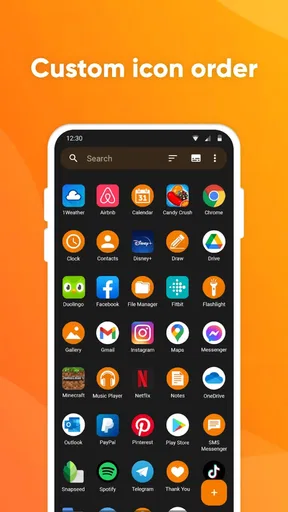
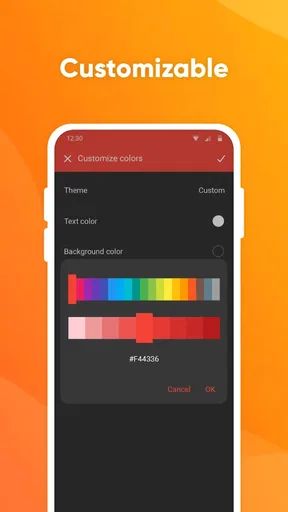
 Analysis by AppCompare
I know the particular frustration this kind of tool is meant to address: I remember the app I want, but not which home-screen page or folder I left it in. Simple App Launcher takes a narrower approach than a full replacement launcher, focusing on a tidy, customizable place to reach chosen apps. That makes it most appealing when the problem is finding everyday essentials, not rebuilding the whole look and behavior of a phone.
It is a free personalization app from Simple Mobile Tool, with optional in-app purchases ranging from $0.99 to $99.99 per item. Its Everyone age rating makes it broadly suitable, and its 4.5 average from around 42,000 ratings suggests many users find the basic idea useful. I would still judge it by fit: a smaller, purposeful app list can feel liberating, while someone who enjoys elaborate home-screen layouts may find the restrained approach limiting.
A small launcher, not a whole phone makeover
The key decision is whether you want a shortcut-oriented holder or a complete home-screen replacement. Full launchers commonly invite you to change the overall desktop, app drawer and visual arrangement; Simple App Launcher is better understood as a focused way to keep favorite apps close and reorder their icons. If your current launcher already has a reliable folder system, switching may add little. If you regularly lose time hunting through a crowded app list, a dedicated, deliberately chosen set can be easier to scan.
I find this distinction useful before installation because “launcher” can mean very different things. This app is not the obvious pick for someone seeking a dramatic redesign, intricate gestures or extensive theme controls. Its value is in reducing the number of choices between unlocking the phone and opening a familiar app. That can be a meaningful improvement, but it is a practical one rather than a visual transformation.
Trust is about choices, not assumptions
With any tool that sits near the apps I use, I pay attention to the actual choices it presents rather than guessing what happens behind the scenes. I would check the permission prompts on my own device, read each one before allowing access, and consider whether the requested access makes sense for the action I am trying to perform. I would not treat a clean-looking interface as proof of a particular data practice, nor would I assume a launcher needs more access than the system asks for.
The same care applies to account and purchase decisions. I would review any purchase screen before confirming anything and use the device’s normal purchase controls. The app is free to start, but optional items have a wide listed price range, so I would not tap through a checkout prompt without checking its exact terms. That is sensible housekeeping, not a reason to assume the app will require a purchase for ordinary use.
Make the shortlist work for real routines
The most useful setup is not necessarily a copy of every app on the phone. I would start with the few tools I reach for repeatedly, then arrange them in an order that matches my day: communication and calendar near the top, perhaps, with travel, banking or media lower down if those are occasional needs. A short list is faster to scan than a second version of the entire app drawer, and it is easier to maintain when my habits change.
Worth Reading Before You Choose

EA SPORTS FC Mobile 26 Is a Bigger Football Game, but It Takes Time

Flipboard Shows What News Apps Must Do Beyond the Feed

Switching to Android Auto Means Rethinking Your Driving Routine

Google Calendar Makes a Crowded Week Easier to Manage

Ludo King Makes the Most of the Minutes Between Plans

Baby Panda World Brings Quick Play to Modern Phones, but Its Game Library Feels Busy
For example, on a weekday morning I might want messaging, a calendar and a transit app immediately available, while a shopping app can stay out of the way until I need it. In the evening, the same holder can still offer the entertainment apps I chose without forcing me to reorganize the phone itself. The practical benefit comes from deciding in advance what deserves a prominent spot, not from adding every installed app just because it is available.
Where simplicity can become friction
A compact favorite-app list also creates a trade-off: anything left out still has to be found through the phone’s usual search or app drawer. If I frequently open many different apps, the shortlist may become another stop rather than a shortcut. I would resist turning it into a duplicate catalog and review it when a new routine makes an old favorite irrelevant. That small bit of upkeep is part of getting value from a curated holder.
Before relying on a home-screen tool for a daily routine, I would also test how it fits alongside the launcher already on the phone. A useful practical check is to add a handful of apps, place the holder somewhere easy to reach, and use it for ordinary tasks for a few days. If I keep bypassing it to use the app drawer, that is a clear sign the arrangement or the approach is not right for me. If it becomes a natural first stop, I can add more deliberately.
Who should try it, and who may prefer another option
I would recommend this focused style to someone who wants quick access to a known set of apps without taking on a full home-screen redesign. It may also suit a person who prefers a restrained interface and wants to make the first screen less cluttered by keeping only regular essentials close. The app has been available since August 20, 2016, and its current version is 5.12.1; it supports Android 6.0 and later, which gives many older devices a route to try it.
On the other hand, I would choose the phone’s built-in folders or search if those already solve the problem. I would look at a more configurable launcher if changing icons, layouts and broader visual details is the main goal. And if the phone is shared, or if I need a carefully controlled way to separate work and personal use, I would first check how the device’s own user and app controls handle that situation instead of assuming a favorite-app holder provides separation or privacy features.
Getting Started with Simple App Launcher
Installing Simple App Launcher was a breeze. I found it on the Play Store, and within a few taps, I was ready to dive in. The interface is refreshingly minimalist, living up to its name. No flashy graphics or overwhelming features; just pure functionality.
Design and Usability
The first thing you’ll notice is its simple layout. The app allows you to organize your apps into categories, making it easy to group similar apps together. You can customize these categories to suit your needs. For instance, I created categories like "Work," "Social," and "Entertainment." This was a game-changer for me, as I no longer waste time searching for apps.
Adding apps to these categories is a straightforward process. Just tap and hold an app icon, and a menu pops up allowing you to add it to an existing group or create a new one. I loved how intuitive this was; no need for a user manual here!
Features That Stand Out
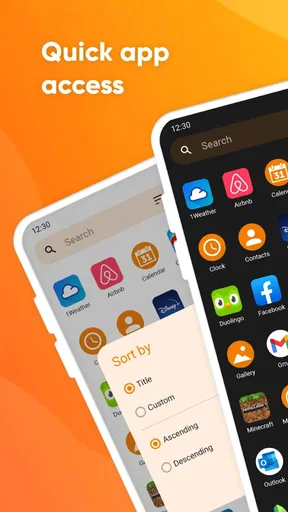
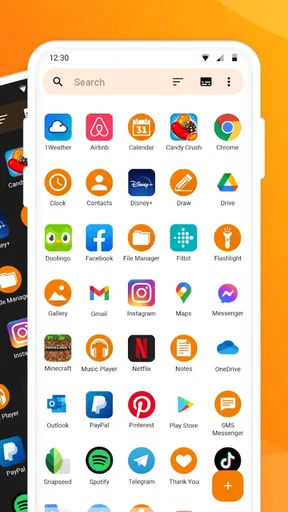
The standout feature for me is the customizable widget. It sits on my home screen, providing instant access to my most used apps. You can adjust the widget size and appearance, which is a nice touch. I went with a compact 2x2 grid that fits perfectly with my phone’s aesthetic.
Another great feature is the search bar. Located at the top of the app, it allows for quick searches. Simply type the first few letters of an app, and it appears instantly. This is especially handy for those less frequently used apps that you might forget the category for.
Performance and Reliability
Performance-wise, Simple App Launcher is smooth as butter. I didn’t experience any lag or crashes during my use. It’s evident the developers focused on creating a stable app, which is refreshing in a world where many apps feel rushed to market.
Battery usage is minimal, a crucial factor for any app living on my home screen. I’ve had no issues with battery drain, even with extensive use throughout the day.
Room for Improvement
While I’m a fan of the app’s simplicity, a few additional customization options wouldn’t hurt. For example, more color themes or icon shapes could make the app even more personal. Also, integrating a dark mode would be a sweet addition for those late-night browsing sessions.
Another potential improvement could be the addition of a backup feature. Having the ability to save your app layout and categories would be beneficial, especially if you’re like me and love switching devices.
Final Thoughts
Overall, I’m impressed with Simple App Launcher. It does exactly what it promises without any unnecessary fluff. For anyone looking to simplify their smartphone experience, this app is worth a try. It might not have all the bells and whistles of other launchers, but its straightforward approach is precisely its charm.
If you're tired of swiping through pages of apps and crave a more organized digital life, give Simple App Launcher a shot. It’s the small tweaks like these that make using technology more enjoyable.
My cautious recommendation is to treat it as a focused convenience, then decide from daily use whether it earns a permanent place on your screen. Simple Mobile Tool has kept the idea straightforward, and the app has passed one million installs. That reach is reassuring as a sign that others have found the format useful, but it is not a substitute for checking permissions and purchase choices yourself. I would begin with a small, useful selection, keep an eye on whether the widget genuinely saves steps, and stick with the phone’s built-in tools if they already do the job. For me, that is the right standard: less searching without pretending a simple app holder is a complete privacy, organization or customization solution.
Pros
- Intuitive user interface for easy navigation.
- Customizable app layout to suit preferences.
- Low memory usage
- enhancing phone performance.
- Quick access to most-used apps.
- Regular updates improve functionality.
Cons
- Limited widget options compared to competitors.
- Occasional lag on older devices.
- Ads can be intrusive in the free version.
- Lack of advanced customization features.
- No dark mode available for night use.
FAQs for Simple App Launcher
What is Simple App Launcher and how does it work?
Simple App Launcher is a lightweight application designed to streamline the process of launching apps on your device. It provides a clean, user-friendly interface where you can organize and access your most-used apps quickly. By setting up custom shortcuts, it reduces the clutter on your home screen and speeds up navigation.
Is Simple App Launcher compatible with all Android and iOS devices?
Simple App Launcher is compatible with a wide range of Android and iOS devices. However, it's always a good idea to check the app store listing for specific compatibility details related to your device’s operating system version to ensure optimal performance.
Does Simple App Launcher affect my device's battery life or performance?
Simple App Launcher is designed to be resource-efficient and should not significantly impact your device’s battery life or performance. By optimizing app access, it can actually help reduce unnecessary background activity, potentially aiding in improved battery management.
Are there any privacy concerns with using Simple App Launcher?
Simple App Launcher prioritizes user privacy and does not require unnecessary permissions. It only accesses data necessary for its functionality, such as app usage statistics, to improve the user experience. Personal data is not stored or shared externally, ensuring your information remains private.
Can I customize the interface of Simple App Launcher to suit my preferences?
Yes, Simple App Launcher offers a range of customization options. Users can personalize the app's interface by changing themes, adjusting icon sizes, and organizing apps into custom folders or categories. This flexibility allows you to tailor the launcher to meet your personal aesthetic and usability needs.


